Linear Algebra for GLSL Shaders
15 / Transform the space

When space flips
or collapses.

Two axes can stretch a drawing, turn it inside out, or flatten it. One number tells us what happens to its area and orientation.

25–35 min with experimentsGLSL ES 3.00 / WebGL 2After chapters 09, 12–14
What we want to make

Know when there is no way back.

Change the two axes ↓

Put an asymmetric letter inside a unit square. Lean its axes together, move one across the other, and watch the square change its orientation. At collapse, keep a schematic outline visible while stopping the inverse lookup.

A unit square becomes a positive-area parallelogram, a mirrored square, or a line when its two matrix columns become parallel.
Area · orientation · collapseRead the two columns through one signed area scale.

In chapter 14, every allowed transformation had a reverse. Now remove that restriction. We need to recognize when a drawing flips, and when an original coordinate can no longer be recovered.

Measure a transformed square

Start with a square one unit wide and one unit high, centered at the origin. Its local coordinates run from −0.5 to 0.5, and its area is 1. Stretch it by 2 horizontally and 0.5 vertically. The rectangle looks different, but its area is still 2×0.5=1.

We already describe a matrix with two columns. Call them a and b:

mat2 M = mat2(a, b);
vec2 world = M * local; // local.x * a + local.y * b

The transformed square has edge vectors a and b. Its four corners are −a/2−b/2, a/2−b/2, a/2+b/2, and −a/2+b/2. Changing the square's center would move this parallelogram without changing its area.

Now use a=(1,0) and b=(1,1). The top leans to the right. The base is still 1 and the perpendicular height is still 1, so the area remains 1. The length of b is √2, but that is the sloping side, not the height. Multiplying column lengths would overestimate the area.

Give the area a sign

For a nonzero a, the vector (−a.y,a.x) points perpendicular to it, to its left in our Y-up world. Divide this vector by length(a), then take its dot product with b. The result is a signed perpendicular height: positive on the left side of a and negative on the right.

Multiplying this height by the base length cancels the division. We get a formula that also works when a is zero:

signedAreaScale = a.x * b.y - a.y * b.x;

This number is the determinant of the 2×2 matrix. GLSL calculates it for us:

float det = determinant(M);
float area = abs(det); // Our original square has area 1.

With GLSL's column indexing, the expanded expression is M[0].x*M[1].y − M[0].y*M[1].x. Keep the order: swapping the two columns changes the sign.

For any flat region transformed by the same linear matrix, the ordinary area is multiplied by abs(det). The sign describes orientation, not a negative physical area. Our centered square is simply a convenient measuring shape.

Read the result

A positive determinant preserves orientation. For a nondegenerate pair, b lies to the left of the directed axis a. A negative determinant reverses orientation; b lies to its right. An asymmetric letter makes this reversal visible even when the square's outline looks unchanged.

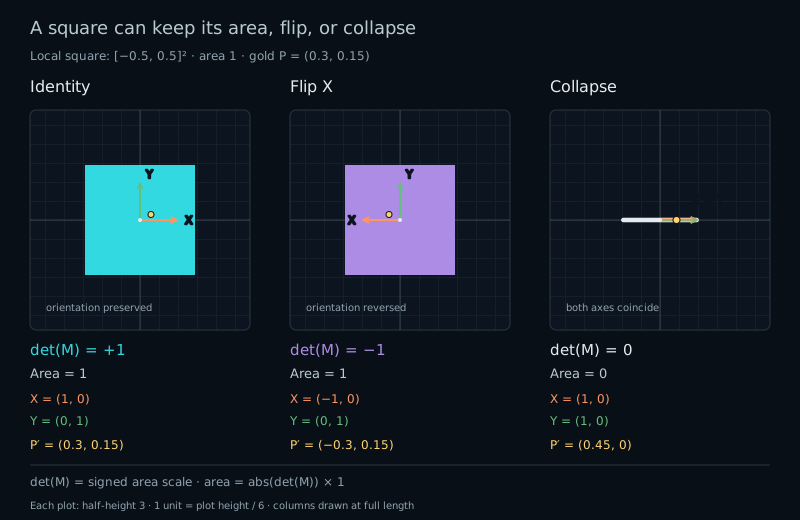
Choose Flip X: a=(−1,0), b=(0,1). The determinant is −1. Area stays 1, but the letter is mirrored horizontally. Negative determinant can accompany stretching, shear, and rotation too; it does not mean that a transform is only a simple mirror.

Next flip both axes: a=(−1,0), b=(0,−1). The determinant becomes +1. Two sign changes preserve orientation. Here the drawing has turned through 180°, so it may look upside down without becoming mirrored.

For diagonal scale, the determinant is scale.x*scale.y. Horizontal shear has determinant 1. Rotation has determinant cos²(angle)+sin²(angle)=1 in exact arithmetic. These familiar cases explain why a shape can change dramatically while keeping the same area.

For a chain, determinant(A*B)=determinant(A)*determinant(B). Each step multiplies the previous area scale and orientation sign. This does not make A*B equal to B*A: the two orders in chapter 13 have the same determinant while sending points to different places.

Find the lost coordinate

Move b down until a=(1,0) and b=(1,0). The determinant is zero. Both edges now follow the same line, so the whole square collapses to the segment from (−1,0) to (1,0).

world = local.x * vec2(1.0, 0.0)
      + local.y * vec2(1.0, 0.0);
// world = vec2(local.x + local.y, 0.0)

Two different local points, (0.4,−0.1) and (0.1,0.2), both reach (0.3,0). The sum survives; the separate coordinates do not. A world pixel cannot tell which original point to retrieve. There is no unique inverse to call.

Parallel columns, opposite columns, or a zero column all give zero determinant. If both columns are zero, every point reaches the origin. The image becomes a point instead of a line. For a 2×2 matrix, determinant zero is exactly the mathematical test for non-invertibility.

The thick line and dot in our preview are schematic marks. Their screen width keeps collapse visible; it does not give the collapsed square a nonzero mathematical area.

Guard the lookup

The filled square and letter use inverse sampling. Check the determinant before calculating the inverse. Computing inverse(M) first and hiding its result afterward does not protect an invalid calculation.

float det = determinant(M);
if (abs(det) > 0.0001) {
    vec2 local = inverse(M) * p;
    // Sample the square and letter here.
}
// Draw the forward edges even when sampling is paused.

The cutoff is a drawing policy for this bounded demonstration. The Near collapse preset uses b=(1,0.00005), giving a nonzero determinant. Its narrow parallelogram is mathematically invertible, but we intentionally pause its fill. The forward outline remains, and the readout distinguishes this state from exact collapse.

A small determinant alone is not a general measure of numerical stability. Uniform scale 0.001 has determinant 0.000001, yet stretches both directions equally. It magnifies absolute coordinate errors on the way back, without the directional imbalance of nearly parallel columns. Conversely, scale=(1000000,0.000001), outside our controls, has determinant 1 and a huge imbalance.

Floating-point subtraction can also lose accuracy when the two products in the determinant nearly cancel. A computed zero may hide a tiny nonzero determinant. The lab uses wider arithmetic for its geometric classification and separately reports the rounded float32 guard reference. Passing this cutoff is not a promise of an accurate inverse. The lab limits each column component to [−2,2], reports its sampling policy, and avoids calling inverse in rejected states. GLSL leaves inverse results undefined for singular or poorly conditioned matrices.

Because the matrix depends only on uniforms, every fragment makes the same branch decision. The fwidth calls used for approximate edge smoothing stay inside that uniform branch. Thin shapes may still be smaller than a pixel; their numerical area is more informative than their visible thickness.

Try it

Two columns. One signed area.

LIVE GLSL / WEBGL 2

Change either column or choose a preset. Compare the signed determinant, ordinary area, and sampling status. The square is centered, has local side length 1, and contains an asymmetric L.

The view stays fixed at −3 to 3 vertically, with equal X/Y units. One unit is one sixth of the canvas height. The arrows show the full columns; the gold reference point is M*(0.3,0.15).

Static comparison: Identity preserves the unit square with determinant 1; Flip X mirrors it with determinant -1 and the same area; Collapse maps it onto a line from (-1,0) to (1,0) with determinant zero.
Cyan: positive determinantPurple: negative determinantWhite L: sampled local motifGold: forward P=(0.3,0.15)Orange arrow + circle: first columnGreen arrow + square: second column

Fixed view half-height 3: y runs from −3 to 3 with equal X/Y units. One unit is one sixth of the canvas height. The original square is centered on the origin, from −0.5 to 0.5 on each axis, and has area 1. Arrows show full columns. All allowed corners and column endpoints fit in this view.

Forward square edges and the gold point remain visible even when sampling is paused. Very thin parallelograms can look like lines at this resolution; a line-like picture alone does not establish a zero determinant.

Columns, area, and orientation

First column · a
Second column · b
Preset values and guard policy

Identity: a=(1,0), b=(0,1). Stretch: a=(2,0), b=(0,0.5). Flip X: a=(−1,0), b=(0,1). Shear: a=(1,0), b=(1,1). All four have area 1; Flip X changes orientation.

Collapse: a=b=(1,0), so the square becomes a line. Near collapse: a=(1,0), b=(1,0.00005), a nonzero determinant whose fill is paused by this demo's guard. Point sets both columns to zero.

The shader calls inverse(M) only when abs(determinant(M)) > 0.0001. Equality is excluded. This is the sampling policy of this bounded experiment, not a universal test of invertibility or numerical conditioning. The forward schematic uses no inverse.

Presets change the columns and preserve overlays. Reset lab restores Identity and both overlays. Reset code restores the shader separately. Use the sliders or number fields; the diagram has no drag handle.

Preparing the live shader.

Signed determinant · input-column reference
1.000000
Mapped unit-square area · |det(M)|
1.000000
Orientation · sign without a tolerance
Positive · preserved
Float32 guard reference · determinant
1.000000
Inverse sampling · |float32 det| > float32(0.0001)
Enabled
First column · a = M[0]
(1.000000, 0.000000)
Second column · b = M[1]
(0.000000, 1.000000)
Forward marker · M*(0.3,0.15)
(0.300000, 0.150000)

The determinant is positive: orientation is preserved. Its absolute value is the mapped unit-square area.

The inverse-sampling guard is enabled. The shader samples the square fill and local L, then draws the forward edges and point.

These are host references, not GPU measurements; shader edits do not change them. All column inputs are first converted to float32. The signed determinant, area, and orientation use wider arithmetic on those input columns to distinguish a true collapse from a nonzero value rounded away by float32 products. The separate float32 guard reference rounds both products and their subtraction, then compares with float32(0.0001). GPU arithmetic may differ slightly near a threshold.

A nonzero determinant means the mathematical matrix has an inverse, even when this lab pauses sampling. Passing this guard does not guarantee a well-conditioned matrix. fwidth supplies approximate screen antialiasing for sampled local fields, not an exact world-space distance. All derivatives are evaluated inside the same uniform-only guard branch.

Every number can be edited directly or changed with its slider and keyboard. Values stay within [−2,2]; small decimals are preserved. Touch swipes scroll normally. There is no animation.

Open the complete shader edit · run · reset

The host supplies uAxisX and uAxisY as matrix columns, plus uResolution and the two overlay flags. The guarded inverse branch draws the sampled fill and L. Four forward edges and the gold point work for every matrix, so they remain outside the branch. All drawing helpers are supplied.

⌘ / Ctrl + Enter to run

The host code handles bounded inputs and the editor. Numerical readouts describe the built-in formulas. Geometric area and orientation use wider host arithmetic on float32 input columns; a separate float32 reference estimates the shader guard. Neither is GPU readback, and neither follows shader edits.

A complete guarded drawing

Paste this smaller shader into the editor. It keeps the square, L, forward outline, and gold reference point. The longer default shader adds grid and axis guides. The segment helper also handles an edge of zero length.

#version 300 es
precision highp float;
uniform vec2 uResolution;
uniform vec2 uAxisX; // First column; each component in [-2, 2].
uniform vec2 uAxisY; // Second column; each component in [-2, 2].
out vec4 fragColor;

float boxField(vec2 p, vec2 halfSize) {
    vec2 q = abs(p) - halfSize;
    return max(q.x, q.y);
}
float segmentDistance(vec2 p, vec2 a, vec2 b) {
    vec2 v = b - a;
    float vv = dot(v, v);
    float t = vv > 0.0 ? clamp(dot(p - a, v) / vv, 0.0, 1.0) : 0.0;
    return length(p - (a + t * v));
}
void main() {
    vec2 p = 3.0 * (2.0 * gl_FragCoord.xy - uResolution) / uResolution.y;
    float pixel = 6.0 / uResolution.y;
    mat2 M = mat2(uAxisX, uAxisY);
    float det = determinant(M);
    vec3 color = vec3(0.035, 0.055, 0.08);

    // A drawing policy for this bounded demo, not a universal test.
    // det depends only on uniforms: every fragment takes the same branch.
    if (abs(det) > 0.0001) {
        vec2 local = inverse(M) * p;
        float field = boxField(local, vec2(0.5));
        float lField = min(boxField(local - vec2(-0.25, 0.0), vec2(0.05, 0.30)),
                           boxField(local - vec2(0.0, -0.25), vec2(0.30, 0.05)));
        float edge = max(fwidth(field), 0.00001);
        float lEdge = max(fwidth(lField), 0.00001);
        float mask = 1.0 - smoothstep(-edge, edge, field);
        float letter = 1.0 - smoothstep(-lEdge, lEdge, lField);
        vec3 fill = det > 0.0 ? vec3(0.12, 0.49, 0.56) : vec3(0.45, 0.25, 0.63);
        color = mix(color, fill, mask);
        color = mix(color, vec3(0.92), letter * mask);
    }

    // Forward corners need no inverse, including at collapse.
    vec2 A = M * vec2(-0.5, -0.5);
    vec2 B = M * vec2( 0.5, -0.5);
    vec2 C = M * vec2( 0.5,  0.5);
    vec2 D = M * vec2(-0.5,  0.5);
    float boundary = min(min(segmentDistance(p, A, B), segmentDistance(p, B, C)),
                         min(segmentDistance(p, C, D), segmentDistance(p, D, A)));
    float line = 1.0 - smoothstep(pixel, 2.0 * pixel, boundary);
    color = mix(color, vec3(0.78, 0.88, 0.93), line);
    vec2 marker = M * vec2(0.3, 0.15);
    float dotMask = 1.0 - smoothstep(0.035, 0.035 + pixel, length(p - marker));
    color = mix(color, vec3(1.0, 0.81, 0.31), dotMask);
    fragColor = vec4(color, 1.0);
}

Your turn

Use Reset lab and Reset code first.

  1. Predict determinant and area for Stretch, Flip X, and Shear before selecting them. Explain why three different drawings can have area 1.
  2. Choose Collapse. Explain why the two local points (0.4,−0.1) and (0.1,0.2) cannot be distinguished afterward. Change only b.y to 0.5, then to −0.5. Predict the sign, area, and whether sampling resumes.
  3. Compare Near collapse with Collapse and Point. Which matrices are mathematically invertible? Which drawings does the guard allow? Explain the difference.
  4. Paste the smaller shader. Change only the sampling cutoff from 0.0001 to 0.2. Set a=(1,0), b=(1,0.1), then b.y=0.3. Explain the fill disappearing and returning without claiming that the first matrix is singular. Restore the original cutoff.
A hint

When a=(1,0), the determinant is simply b.y. The centered square has original area 1, and the guard tests the magnitude of the determinant. A negative value is not a reason to reject the inverse.

Check your result

Stretch gives +1, Flip X gives −1, and Shear gives +1; all have area 1. Changing b.y from 0 to 0.5 or −0.5 restores independent axes, area 0.5, and inverse sampling. The negative case reverses orientation.

Near collapse has determinant 0.00005 and a mathematical inverse, but the demo pauses sampling. Collapse and Point have determinant zero and no inverse. With the edited cutoff, determinant 0.1 is rejected while 0.3 is accepted; both remain mathematically invertible. The forward outline stays available in every case.

What you can do now

Predict area, orientation, and collapse from the determinant. You can explain which coordinate information is lost and guard an inverse lookup before evaluating it. Next, we will put translation and a linear transform into one larger matrix.