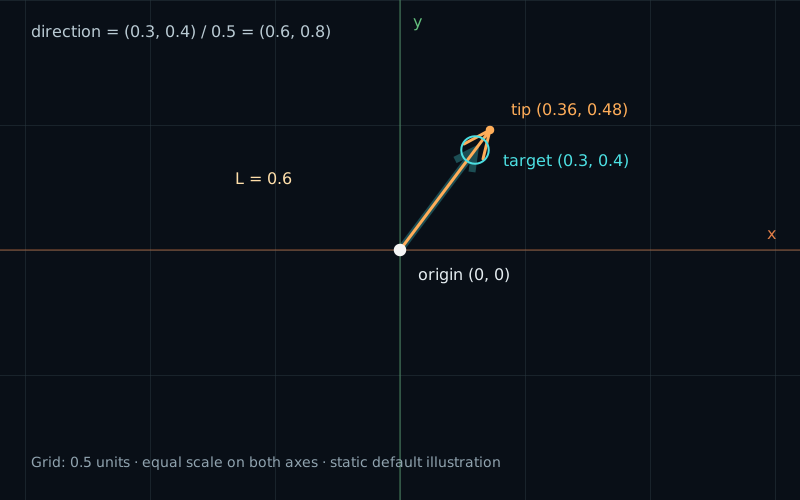
A pointer, a small light indicator, or an aiming guide can point toward a target without reaching it. We want the arrow to turn as the target moves, while keeping its own size.
We already have the two ingredients. Chapter 02 gave us the displacement between points. Chapter 03 gave us its length. Now we will use that length to remove the displacement’s size.
Reach the target or aim at it
Start with an origin and a target in the same equal-unit coordinate space:
vec2 origin = vec2(0.0);
vec2 target = vec2(0.3, 0.4);
vec2 v = target - origin;
vec2 tip = origin + v; // Exactly the target.
This arrow reaches the target. Its length is 0.5. Move the target to (0.6, 0.8) and the displacement doubles. The arrow grows to length 1.0.
Multiplying by a constant does not solve the problem. v * 0.6 still doubles when v doubles. We need to remove the original length before applying the one we want.
Make the length one
Divide both components by the same length:
float len = length(v); // 0.5
vec2 direction = v / len;
// (0.3 / 0.5, 0.4 / 0.5) = (0.6, 0.8)
Division by a positive number scales the whole vector without turning it. The components keep the same proportion and signs. Because we divided by its own length, the resulting vector has length one:
// sqrt(0.6 * 0.6 + 0.8 * 0.8)
// = sqrt(0.36 + 0.64) = 1.0
This is a unit vector. Making a nonzero vector’s length one is called normalization. In exact arithmetic, length(v / length(v)) is one. GPU calculations have finite precision, so measured results can differ slightly from one.
Notice that neither component must equal one. The pair together has length one. A diagonal direction such as (0.6, 0.8) is just as valid as (1, 0) or (0, -1).
For a nonzero vector, GLSL provides the shorter form:
vec2 direction = normalize(v);We will use explicit division in the demo so we can inspect the length and check it before dividing. Both forms express the same operation for an ordinary nonzero input.
Choose a new length
Multiply the unit direction by the desired arrow length, then add the origin:
float arrowLength = 0.6;
vec2 displacement = direction * arrowLength; // (0.36, 0.48)
vec2 tip = origin + displacement;
arrowLength uses our coordinate units. Its value no longer depends on the target distance. With the origin at zero, the tip is (0.36, 0.48). Its distance from the origin is 0.6.
The target is only 0.5 units away, so this arrow ends beyond it. That is expected: we are aiming at the target, not trying to stop there.
| Target | Target distance | Unit direction | Arrow tip |
|---|---|---|---|
| (0.15, 0.20) | 0.25 | (0.6, 0.8) | (0.36, 0.48) |
| (0.30, 0.40) | 0.50 | (0.6, 0.8) | (0.36, 0.48) |
| (0.60, 0.80) | 1.00 | (0.6, 0.8) | (0.36, 0.48) |
All three targets lie along the same direction from the origin. Their distances differ, but normalization produces the same direction. Move the target around the origin instead, and the arrow turns.
At arrowLength = 0, the tip coincides with the origin. The chosen direction can remain valid even though the displayed arrow has no extent. A negative multiplier would reverse it, as in chapter 02; this playground limits length to zero or greater.
When the points coincide
Now put the target exactly at the origin. The displacement and its length are both zero. Which direction should the arrow use?
There is no direction in that input. Dividing by zero cannot recover one, and normalize(vec2(0.0)) cannot supply a meaningful unit direction. We must choose the behavior ourselves.
vec2 v = target - origin;
float len = length(v);
vec2 direction = vec2(1.0, 0.0); // Our chosen fallback: right.
if (len > 0.0001) {
    direction = v / len;
}
vec2 tip = origin + direction * arrowLength;
The check comes before the division. When the length is too small, we use a known unit vector. This keeps the result finite and gives the image a defined state.
The threshold 0.0001 is in coordinate units. It is a chosen tolerance for this small scene, whose visible vertical range is -1 to 1. It also avoids letting tiny changes very close to the origin determine the direction. It is not a universal constant to copy into every application. Very close to the threshold, floating-point rounding can affect which side a value falls on; the Near zero preset uses a length safely below it.
A fixed fallback may cause a visible turn to the right when the target reaches the origin. That is our policy, not a direction hidden inside the zero vector. Another useful policy is to keep the last valid direction. We will try both below.