Linear Algebra for GLSL Shaders
08 / Make directions useful

Turn a direction
around.

Bounce a direction from a surface. Keep the part that runs along the mirror and reverse the part that runs through it.

25–35 min with experimentsGLSL ES 3.00 / WebGL 2After chapters 04, 06 and 07
What we want to make

One ray in. One ray out.

Turn the mirror ↓

A sloping ray meets a horizontal mirror and leaves on the other side of the normal. Rotate the mirror, and the same formula still works. We will draw the arrows first; finding a collision in a whole scene is a separate problem.

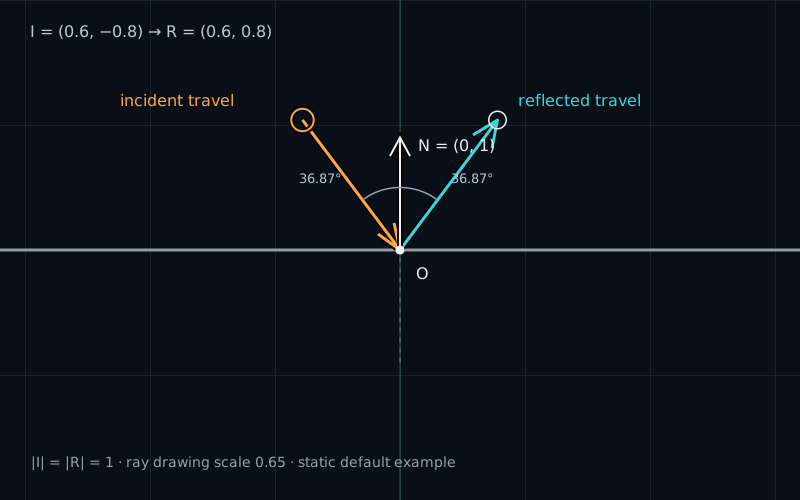
An incident direction I=(0.6,-0.8) meets a horizontal mirror. With unit normal N=(0,1), the reflected direction is R=(0.6,0.8). The horizontal component stays the same and the vertical component changes sign.
Split → reverse one component → combineI = (0.6, −0.8) · N = (0, 1) · R = (0.6, 0.8)

In chapter 07, projection found the part of a displacement along a line. We can use that same operation to separate a ray into two perpendicular parts. A mirror leaves one part alone and reverses the other.

Which way does I point?

Put the contact point at the origin. Our mirror is the horizontal line through it. The incident vector I describes the direction of travel toward the contact:

vec2 incident = vec2(0.6, -0.8);
vec2 normal = vec2(0.0, 1.0);

The ray travels right and down. We draw its tail above and left of the contact, then point the arrow toward the origin. Drawing an arrow from the origin toward incident would show the same vector translated to a different starting point, but it would look like a ray continuing through the mirror.

The surface normal is a unit vector perpendicular to the mirror. Here it points up. Both vectors use the same two-dimensional coordinate space. The normal has length one; the incident vector does not have to. Its length might represent the size of a step or a speed that we want to preserve.

Split the direction

Project the incident vector onto the unit normal. The dot product gives one signed number. Multiplying by the normal turns it into the perpendicular part of the vector:

float towardNormal = dot(incident, normal); // -0.8
vec2 normalPart = towardNormal * normal;    // (0.0, -0.8)
vec2 tangentPart = incident - normalPart;   // (0.6,  0.0)

The negative dot product matters. Our normal points up, but the ray travels down toward the mirror. Its normal component therefore points opposite to the normal.

Subtracting that component leaves the part along the mirror. This is the tangent component. Add the two parts and we recover the original incident vector. For a tilted mirror, the components need not match the X and Y axes, but their geometric roles stay the same.

Why is the remainder tangent? Dot it with the unit normal: dot(I, N) - dot(I, N) * dot(N, N). Since dot(N, N) = 1, the result is zero. The two components are perpendicular.

Reverse the normal part

The reflected ray keeps traveling along the surface in the same direction. Its motion through the surface must change sign:

vec2 reflected = tangentPart - normalPart; // (0.6, 0.8)

We already have tangentPart = incident - normalPart. Substitute it into the expression:

vec2 reflected = incident
               - 2.0 * dot(incident, normal) * normal;

The factor of two removes the original normal component and adds its opposite. Subtracting it only once would leave the tangent component, a ray sliding along the mirror.

GLSL provides the same operation:

vec2 sameReflected = reflect(incident, normal);

This function uses the supplied vectors directly. It does not normalize either argument for us. With a unit normal, the manual formula and reflect describe the same result, up to floating-point rounding.

Keep the length and angle

Write the incident vector as the sum of its tangent and normal components. The reflected vector contains the same tangent component and the negative normal component. Because those components are perpendicular, the squared length is the sum of their squared lengths. Changing one sign does not change that sum.

Our example has length sqrt(0.6 * 0.6 + 0.8 * 0.8) = 1 before and after reflection. Scaling the incident vector scales the reflected vector by the same amount. We do not need to normalize a velocity just to reflect it.

The normal component has the same magnitude on both sides, so the incoming and outgoing paths make equal angles with the normal line. For the example, both angles are about 36.87 degrees. Compare the incoming path from the contact back toward its source, rather than measuring from the forward incident arrow to the upward normal.

The lab reports the acute angle to the normal line. It accepts a ray arriving from either face of the mirror. Reversing the normal selects the other face but does not change the reflected vector: both dot(I, N) and N change sign, so their product stays the same.

At normal incidence, the whole vector reverses, so the incoming and outgoing paths overlap. At exact tangency, the dot product is zero and the direction stays unchanged. That tangent case is the algebraic limit of a grazing ray; the demo does not claim that a separate collision occurred.

Use a unit normal

Suppose we replace N = (0,1) with (0,0.5) without normalizing. The direction looks right, but the projection is wrong:

dot(incident, vec2(0.0, 0.5)) // -0.4
// Wrong reflected result: (0.6, -0.4)
// Wrong length: sqrt(0.52), about 0.72111

The normal appears twice in the formula. Halving it reduces the correction to a quarter of its proper size. The resulting ray still points into the other side of the mirror, and its length is no longer preserved.

Normalize a valid normal before using it. As in chapter 04, avoid dividing a zero or tiny vector by its length:

float normalLength = length(uNormal);
vec2 normal = normalLength > 0.0001 ? uNormal / normalLength : vec2(0.0, 1.0);

The fallback chooses an upward normal, hence a horizontal mirror. This is an explicit choice for our small scene. A zero normal cannot describe a surface orientation. A zero incident vector is different: its reflected vector is also zero, but it has no direction and no angle to report.

Try it

Keep one part. Reverse the other.

LIVE GLSL / WEBGL 2

Turn the mirror, change the incident vector, and show its components. Compare the manual formula with reflect, then watch the lengths and angles.

Coordinates have equal units and no extra zoom. Ray arrows show 0.65 times their vectors to fit the scene; numerical lengths refer to the original vectors. The normal arrow has its own fixed display length.

Static default example: incident I=(0.6,-0.8), unit normal N=(0,1), and reflected R=(0.6,0.8). Both vector lengths are 1. Both rays make an acute angle of about 36.87 degrees with the normal line. The contact is at the origin.
Amber: incident travel toward OCyan: reflected travel from OWhite arrow: normal NWhite ring: built-in reflect endpoint

Equal coordinate units; no extra zoom. Vertical range: −1 to 1. Grid: 0.5 units.

The incident ray travels from −0.65 × I to O. The reflected ray runs from O to 0.65 × R. This fixed drawing scale keeps the rays in view; numerical lengths below are the original vector lengths. The normal arrow is 0.45 × N.

Mirror and incident vector

The host converts degrees to radians once, then sets raw N = scale × (−sin(angle), cos(angle)). The shader normalizes this vector. At length ≤ 0.0001 it uses (0,1), a horizontal mirror.

Incident vector I · points toward contact

These incident presets restore a horizontal mirror with raw normal (0,1). Grazing uses I = (0.995,−0.1), whose length is close to 1. Either side of the mirror accepts an incident ray.

Reset lab restores the controls. Reset code, below the editor, restores the shader.

Preparing the live shader.

Incident vector · I
(0.60000, −0.80000)
Raw normal · uNormal
(0.00000, 1.00000)
Raw normal length
1.00000000
Unit / fallback normal · N
(0.00000, 1.00000)
Signed component · dot(I,N)
−0.80000
Normal component · dot(I,N) × N
(0.00000, −0.80000)
Tangent component · I − normalPart
(0.60000, 0.00000)
R · I − 2 × dot(I,N) × N
(0.60000, 0.80000)
reflect(I,N) · host reference
(0.60000, 0.80000)
Formula comparison · max component difference
0.00e+0
Original vector lengths · |I|, |R|
1.00000, 1.00000
Acute angles to normal line · incoming, reflected
36.8699°, 36.8699°

The raw normal is long enough to normalize. Reflection uses a unit normal.

Reflection keeps the tangent component and reverses the normal component. Flipping N leaves the reflected vector unchanged.

These are host float32 reference calculations for the built-in, normalized-normal formulas; they are not GPU measurements. The GPU may round the last digits differently. Shader edits do not change these readouts. For the deliberately unnormalized-normal experiment, compare the rendered ray with the edited code. Angles are the acute angles to the normal line, computed with abs and a clamp before acos; they are undefined for zero I.

Click or drag the amber tail to set I = −tail / 0.65. Clicking elsewhere places the tail there, within the component limits. Focus the diagram and use arrow keys to move the tail by 0.05 coordinate units; hold Shift for 0.25. On a touch screen, tap a location or use the controls; a swipe scrolls the page. I.x and I.y stay between −1 and 1.

Open the complete shader edit · run · reset

The page supplies uIncident, raw uNormal, uShowComponents, and uResolution. The one-line normal calculation in main() includes the zero-length guard. The following lines calculate the components and reflection. All drawing helpers are supplied below.

⌘ / Ctrl + Enter to run

The host converts the mirror-angle control into a perpendicular raw normal and passes it as uNormal. Its scale control changes the raw normal's length. The shader normalizes it. Grid, arrows, and component guides are supplied drawing helpers; the complete host code is available.

A complete ray shader

This smaller version draws the mirror and both arrows. Paste it into the editor. The controls still supply the incident vector and raw normal; component guides belong to the longer default shader.

#version 300 es
precision highp float;
uniform vec2 uResolution;
uniform vec2 uIncident;
uniform vec2 uNormal;
out vec4 fragColor;

// The closest-point calculation from chapter 07.
float segmentDistance(vec2 p, vec2 a, vec2 b) {
    vec2 ab = b - a;
    float squaredLength = dot(ab, ab);
    float t = squaredLength > 0.00000001
        ? clamp(dot(p - a, ab) / squaredLength, 0.0, 1.0) : 0.0;
    return length(p - (a + t * ab));
}

float arrowDistance(vec2 p, vec2 a, vec2 b) {
    vec2 v = b - a;
    float len = length(v);
    if (len <= 0.0001) return length(p - b);
    vec2 direction = v / len;
    vec2 side = vec2(-direction.y, direction.x);
    float head = min(0.08, len * 0.3);
    vec2 base = b - head * direction;
    float d = segmentDistance(p, a, b);
    d = min(d, segmentDistance(p, b, base + head * 0.5 * side));
    return min(d, segmentDistance(p, b, base - head * 0.5 * side));
}

void main() {
    vec2 p = (2.0 * gl_FragCoord.xy - uResolution) / uResolution.y;
    float normalLength = length(uNormal);
    vec2 normal = normalLength > 0.0001 ? uNormal / normalLength : vec2(0.0, 1.0);
    vec2 reflected = uIncident - 2.0 * dot(uIncident, normal) * normal;
    float edge = 2.0 / uResolution.y;
    vec3 color = vec3(0.04, 0.06, 0.09);
    float mirror = 1.0 - smoothstep(0.009 - edge, 0.009 + edge,
                                  abs(dot(p, normal)));
    color = mix(color, vec3(0.45, 0.50, 0.57), mirror);
    float incoming = 1.0 - smoothstep(0.012 - edge, 0.012 + edge,
        arrowDistance(p, -0.65 * uIncident, vec2(0.0)));
    float outgoing = 1.0 - smoothstep(0.012 - edge, 0.012 + edge,
        arrowDistance(p, vec2(0.0), 0.65 * reflected));
    color = mix(color, vec3(1.0, 0.68, 0.30), incoming);
    color = mix(color, vec3(0.20, 0.80, 0.83), outgoing);
    fragColor = vec4(color, 1.0);
}

The helper uses distances to short segments to draw arrowheads. These drawing choices do not participate in the reflection calculation. To use the built-in function, replace only the line that assigns reflected with vec2 reflected = reflect(uIncident, normal);.

Your turn

Use Reset lab and Reset code before starting.

  1. Predict the normal and tangent components for the default incident vector. Show components, then compare both formulas, both lengths, and both angles.
  2. Try Head-on, Grazing, and Tangent. Predict whether the direction reverses, changes slightly, or remains unchanged. Turn the mirror and find a head-on configuration again.
  3. Restore the default setup and use the smaller shader. Set the raw normal scale to 0.5. First check that normalization preserves the result. Then replace the entire vec2 normal = ...; line with vec2 normal = uNormal; and run it. Explain the new outgoing arrow.
  4. Restore the normalization line or use Reset code. Reverse the normal and check that reflection is unchanged. Try Zero incident and Normal scale · 0, and explain why they need different descriptions.
A hint

For a horizontal mirror, the tangent component is horizontal. A unit normal changes only the sign of the perpendicular part. Readouts always calculate the built-in normalized reference; editing the shader changes the picture, not those reference numbers.

Check your result

The default components are (0,-0.8) and (0.6,0). Reflection gives (0.6,0.8) with length 1; both angles are about 36.87°. Head-on gives (0,1). Grazing reflects (0.995,-0.1) to (0.995,0.1); Tangent leaves (1,0) unchanged.

With raw normal (0,0.5) and normalization removed, the outgoing vector becomes (0.6,-0.4), with length about 0.72111. It crosses into the wrong half-plane. Restoring normalization recovers the original result. Reversing a valid normal leaves the mirror and reflection unchanged. Zero incident gives a zero result with no angle; zero normal uses the explicitly chosen upward fallback.

What you can do now

Turn the mirror while preserving the incident vector's length after reflection, and explain the equal angles using its two components. You can derive the formula instead of memorizing a sign change on one axis. Next, we will use a pair of directions to describe the same point in a new coordinate system.