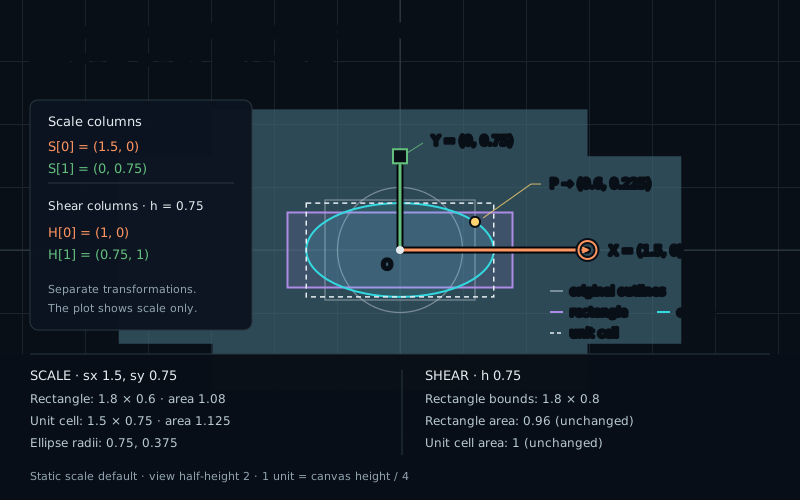
In chapter 11, the matrix columns kept unit length and stayed perpendicular. We will now relax those conditions. Keep reading each column as the destination of one local axis step, as we did in chapter 10.
Give each axis a length
To make one X step become two world units, choose (2,0) for the first column. To keep Y unchanged, choose (0,1) for the second. Generalize those two choices:
mat2 S = mat2(scaleX, 0.0,
              0.0, scaleY);
vec2 world = S * local;
The columns are (scaleX,0) and (0,scaleY). Expanding the product gives world.x=scaleX*local.x and world.y=scaleY*local.y. The factors are dimensionless ratios between output and input lengths along these axes.
Our card starts with half-width 0.6 and half-height 0.4, so its full size is 1.2 by 0.8. Choose scale=(1.5,0.75). The new size is 1.8 by 0.6. The test point P=(0.4,0.3) becomes (0.6,0.225).
The lab restricts both factors to [0.2,2]. A factor below one squeezes that coordinate; above one stretches it. One leaves it unchanged. Negative factors and zero introduce reflection and collapse, which we will examine later.
Watch a circle change
Equal factors produce uniform scale. Every displacement gets the same length multiplier, and angles stay the same. With scale=(1.5,1.5), a circle of radius 0.5 becomes a circle of radius 0.75.
Unequal factors produce nonuniform scale. The circle becomes an ellipse. Its horizontal and vertical semiaxes are 0.5×scaleX and 0.5×scaleY. For the wide card preset, they are 0.75 and 0.375. A boundary point satisfies:
(world.x / (0.5 * scaleX))²
  + (world.y / (0.5 * scaleY))² = 1
This is a mathematical equation, not a GLSL assignment. It says that dividing out the two stretches returns us to the original circle.
The coordinate axes remain perpendicular under positive diagonal scale, but that does not mean every right angle survives. Consider a=(1,1) and b=(1,-1). Their dot product is zero. Scale by (2,1), and they become (2,1) and (2,-1), whose dot product is 3. Their angle changed.
Different directions now have different length multipliers. This is why a stretched circle is a useful test: it shows a whole set of directions at once.
Lean the Y axis
Now leave the X step at (1,0), but send the Y step to (shear,1). Every row keeps its height while shifting horizontally by an amount proportional to that height:
mat2 H = mat2(1.0, 0.0,
              shear, 1.0);
vec2 world = H * local;
// world.x = local.x + shear * local.y
// world.y = local.y
This is a horizontal shear. At shear=0.75, a point one unit above the origin shifts 0.75 units right. A point one unit below shifts 0.75 units left. Points on y=0 do not move. The card becomes a parallelogram, with horizontal top and bottom edges.
P=(0.4,0.3) becomes (0.625,0.3). The X column still has length 1, while the Y column (0.75,1) has length 1.25. Their dot product is 0.75, so they are no longer perpendicular.
A rotation would turn both axes together and keep both lengths. A shear leaves one axis fixed while changing the other. It also turns the circle into an ellipse, generally tilted. The images of the original circle's X and Y endpoints are easy to predict, but they are not generally the principal axes of that tilted ellipse.
What happens to area?
Watch the outlined unit cell, originally a centered square with side length one. Scaling gives it width scaleX and height scaleY. Its area becomes their product. For (1.5,0.75), the area multiplier is 1.125; for (1.5,1.5), it is 2.25.
Horizontal shear keeps the cell's horizontal base at length one and the perpendicular height at one. Its area stays one even though a slanted edge gets longer. Use base times perpendicular height, not the product of the two edge lengths.
The card similarly keeps area 1.2×0.8=0.96 under shear. At shear=0.75, its bounding box is 1.8 wide and 0.8 high, but that surrounding rectangle includes empty corners. Its area is not the area of the parallelogram.
Area alone cannot identify the transformation. Scale=(2,0.5) also has area multiplier one, but it keeps the coordinate axes perpendicular and changes both lengths. Read the columns and the picture together.
Sample the original drawing
As with rotation, a fragment shader starts at a fixed world pixel p and asks for the original local coordinate. Undo scale by division. Undo horizontal shear by subtracting its row-dependent shift:
// Scale mode: both factors are positive and at least 0.2.
vec2 local = p / uScale;

// Shear mode, used separately:
vec2 local = vec2(p.x - uShear * p.y, p.y);
Choose one declaration for the selected mode. The shear reversal works because y did not change: we know exactly which horizontal offset to subtract. Neither expression needs the general matrix inverse yet.
For scale=(1.5,0.75), world (0.6,0.225) maps back to P=(0.4,0.3). For shear=0.75, world (0.625,0.3) does the same. Multiplying p by the scale factors during lookup would make the visible object smaller when those factors grow.
Keep distance claims precise
The expression length(local)-0.5 still identifies the circle's boundary at zero, and its sign still separates inside from outside. After nonuniform scale or shear, its magnitude is not the world-space distance to the transformed boundary.
For scale=(2,1), world (1.2,0) gives local distance 0.1, while its nearest ellipse boundary is 0.2 world units away. World (0,0.6) also gives local distance 0.1, but its boundary is only 0.1 world units away. One global multiplier cannot repair both.
We can still use this local field to draw the correct shape. The supplied shader uses fwidth(field), an estimate of how much the field changes across nearby screen fragments, to soften its edge over roughly pixel-sized transitions. This helps rendering; it does not turn the field into an exact world-distance function.