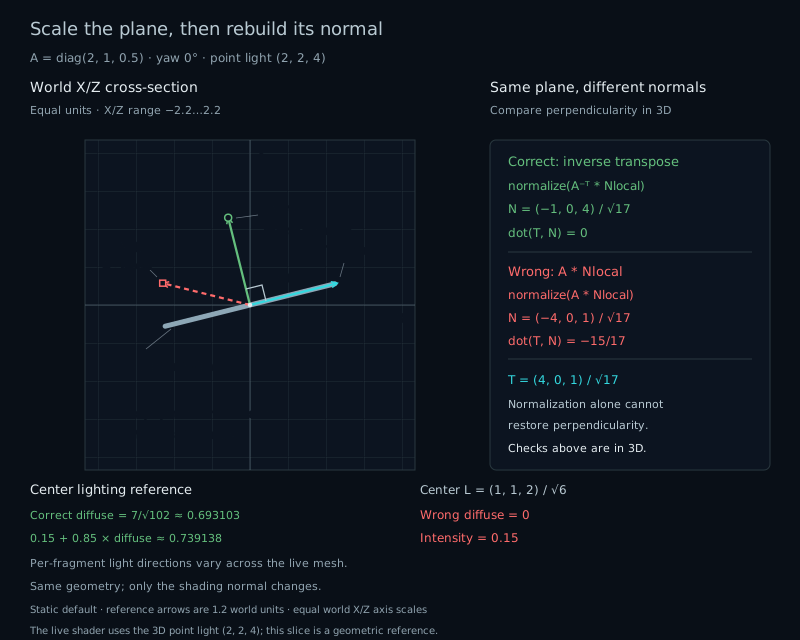
Stretch a lit card sideways. Its outline changes as expected, but the light suddenly seems to point somewhere else. Rotating the normal with the model worked before. Why does adding scale break it?
Keep the geometry. Change the normal.
Open the lab at Stretch and switch between Correct and Wrong. The mesh stays still. Only the normal used for lighting changes. Correct keeps the surface bright; Wrong leaves much of it dark.
Both methods produce unit vectors. That rules out a length problem. We need to check whether each vector still points perpendicular to the transformed surface. The X/Z cross-section draws those directions with equal scale on both axes, making the right angle visible. A perspective view does not generally preserve that angle on the screen.
Give the surface a tangent
A tangent points along a surface. Our local card is already tilted: its horizontal direction T climbs equally in X and Z, while its other direction B follows Y. From chapter 18, their cross product supplies a perpendicular normal:
vec3 T = normalize(vec3(1.0, 0.0, 1.0));
vec3 B = vec3(0.0, 1.0, 0.0);
vec3 localNormal = cross(T, B); // (-1, 0, 1) / sqrt(2)
vec3 localPosition = u * T + v * B;
The card spans u and v from −0.8 to +0.8. Its four corners form two indexed triangles, as in chapter 20. Each vertex carries a position, this same local normal, and UV coordinates. No hidden curved geometry is needed to reveal the error.
A direction can lose its angle
Let A be the linear 3×3 part of the model matrix. A tangent transforms as A*T, because it describes the difference between nearby positions. Translation cancels from that difference.
At Stretch, A scales X by 2, Y by 1, and Z by 0.5. The transformed tangent points along (4,0,1). Applying A to the local normal instead gives direction (−4,0,1). Their unit-vector dot product is −15/17, about −0.88235. They are clearly not perpendicular.
Normalizing the wrong result only fixes its length. It cannot repair its direction. Treating a normal as a vec4 with w=0 excludes translation, but still applies the same incorrect linear scale.
Preserve the zero dot product
Call the original normal n and any local tangent t. We know dot(n,t)=0. After transforming the surface, we want a new normal n′ for which dot(n′,A*t)=0.
A transpose lets us move A to the other side of the dot product. Choose the transformed normal so that the expression becomes our original zero:
dot(n′, A*t) = dot(transpose(A)*n′, t)
transpose(A)*n′ = n
n′ = inverse(transpose(A))*n
   = transpose(inverse(A))*n
This is the inverse transpose, usually called the normal matrix. It preserves the normal's relationship with every transformed tangent. It does not promise a unit result, so we still normalize before lighting.
For a diagonal scale, inverse transpose means reciprocal scale. Our normal changes from (−1,0,1)/sqrt(2) to (−0.5,0,2)/sqrt(2). After normalization, it is (−1,0,4)/sqrt(17). Its dot with the unit tangent (4,0,1)/sqrt(17) is exactly zero before rounding.
Rotate after the reciprocal scale
The lab uses A=R*S: scale first, then rotate around Y. Its normal matrix is R*inverse(S). The same rotation follows reciprocal scale, keeping the corrected normal attached as the card turns.
For a pure rotation, inverse transpose equals the rotation itself. Positive uniform scale also preserves the direction after normalization. Choose Uniform to see Correct and Wrong agree. For this particular plane they also agree whenever sx=sz, even if sy differs: the normal has no Y component.
All scales stay between 0.25 and 2. The model is invertible, and its positive determinant preserves the chosen orientation. Zero scale would remove a dimension; its inverse would not exist. GLSL does not define useful inverse results for singular or poorly conditioned matrices. The lab excludes these cases rather than inventing a normal.
// The mathematical operation, written in GLSL:
mat3 normalMatrix = transpose(inverse(mat3(model)));
The running example computes this constant matrix in JavaScript only when the model changes, then uploads uNormalMatrix. Moving the light does not require another inverse. The complete host source includes the cofactor calculation, determinant guard, mesh buffers, uniforms, and context recovery.
Give both directions the same space
The transformed normal is in world space. The light direction must be there too. Subtract each fragment's world position from the point light's world position, then normalize the displacement.
vec3 N = unitOrZero(vWorldNormal);
vec3 L = unitOrZero(uLightPosition - vWorldPosition);
float diffuse = max(dot(N, L), 0.0);
The dot product from chapter 06 becomes brightness: one when light points along the normal, zero at a right angle, and clamped to zero behind the surface. Mixing a world normal with a local light direction would compare different coordinate systems.
At the card's center, the default light (2,2,4) gives L=(1,1,2)/sqrt(6). Correct diffuse is 7/sqrt(102)≈0.69310. Wrong produces a negative dot, so its diffuse is zero. The center readout predicts this point only; a point light's direction varies across the card.
A light at the shaded point has no direction. The helper checks squared length against 1e−8, about 0.0001 units in length, before returning L=0 and diffuse=0. This boundary policy applies independently at each fragment. A light exactly on this flat plane gives zero correct diffuse across the plane: every remaining light displacement is tangent to it.
Normalize where you use the normal
The vertex shader passes the transformed normal and world position to the fragment shader. Smooth varyings use perspective-correct interpolation, but interpolation does not preserve vector length.
For example, equal weights between unit normals (1,0,0) and (0,1,0) produce (0.5,0.5,0), whose length is about 0.707. Normalize the interpolated result before taking the lighting dot product. Our flat card supplies identical normals at every vertex, so this particular interpolation does not shorten them; the fragment normalization also handles the length changed by the normal matrix.
The small unitOrZero helper below checks length before dividing. With the lab's permitted models, the surface normal is safely nonzero. The guard also gives a defined result if an edited shader supplies a zero normal.
Keep the material modest
The material multiplies its base color by 0.15 + 0.85*diffuse. The first term keeps unlit areas visible; it is a fixed artistic ambient term. The checker follows local UV, while an optional border makes the plane easier to read. Neither changes the normal mathematics.
This is an educational diffuse material, without distance attenuation, shadows, or specular reflections. The camera stays at (0,0,7), with vertical FOV 45°. Moving the light changes illumination, not projection. The light itself may be outside the view; its position still affects the visible card.
AGSL RuntimeShader uses a different host pipeline. To reuse the lighting idea, provide explicit position and normal fields in one chosen space; WebGL vertex attributes and gl_Position are not an AGSL mesh stage.